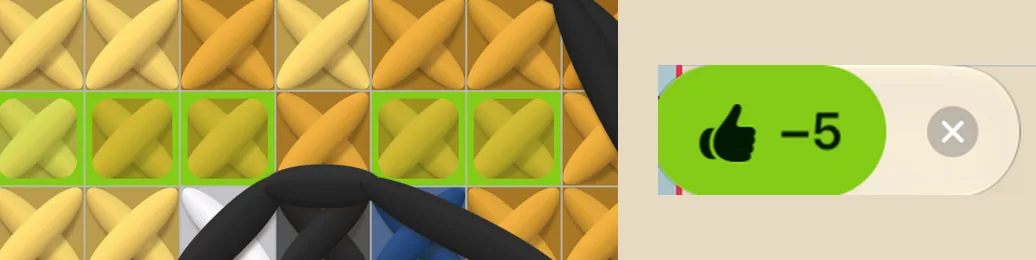
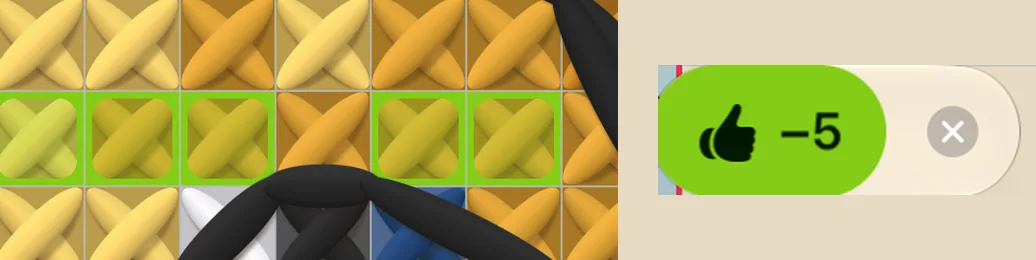
With the eraser chosen, drag one finger across a row: it takes off every square it crosses, and two fingers move the chart.
A stroke over a backstitch line takes the whole line off.
(1) Mark sews a row. (2) Switch to the eraser. (3) The same squares are taken back.
Undo and redo
Tap the chart with two fingers to undo. Tap with three fingers to redo.
On iPad, Undo and Redo also sit at the foot of the colour rail.
One 👍 is one step, however many squares it marked.
Mark a stitch to rip out later
Found a mistake you will unpick later? Press and hold the square and tap Rip out later. The stitch still counts as done, and it carries a mark so you can find it again.
A Rip out button appears at the foot of the chart and takes you from one such place to the next.
Once you have unpicked it, hold the square and tap Ripped out: the mark goes and the stitch counts as not done.
Keep it takes the mark away and leaves the stitch as it was.
Коли вибрано гумку, проведіть одним пальцем по ряду: знімається кожна клітинка, через яку він пройде, а двома пальцями схема рухається.
Рух по лінії бекстічу знімає всю лінію.
(1) «Позначити» вишиває ряд. (2) Перемкніться на гумку. (3) Ті самі клітинки знято.
Скасувати й повторити
Торкніться схеми двома пальцями, щоб скасувати. Трьома — щоб повторити.
На iPad кнопки Скасувати і Повторити є ще й унизу шкали кольорів.
Одне 👍 — один крок, хоч скільки клітинок воно позначило.
Позначити стібок, щоб розпороти пізніше
Помітили помилку, яку розпорете згодом? Утримуйте клітинку й торкніться Розпороти пізніше. Стібок і далі рахується вишитим, але має позначку, щоб ви його знайшли.
Унизу схеми з’являється кнопка Розпороти: вона веде від одного такого місця до наступного.
Коли розпорете, утримуйте клітинку й торкніться Розпорото: позначка зникне, а стібок рахуватиметься невишитим.